


| Tipo | DVB-T / T2 H.265 | DVB-T / T2 H.264 | DVB-T | ISDB-T |
| 4 Sintonizador 4 Antena | DVB-T26540 | DVB-T240 | / | ISDB-T7800 |
| 2 Sintonizador 2 Antena | DVB-T265 | DVB-T221 | DVB-T7200 | ISDB-T9820 |
| 1 Sintonizador 1 Antena | / | DVB-T2K | DVB-T7000 | ISDB-T63 |
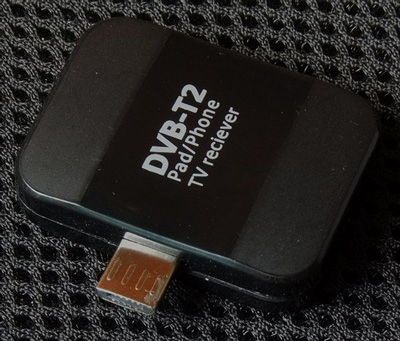
TDH601 Pad TV DVB-T2 Receptor para Android Phone/Pad USB Sintonizador de TV Pad TV


Detalhes do produto do sintonizador de tv pad DVB-T2 TDH601 Pad TV receber pad TV stick Assistir DVB T2 TV no telefone Android/Pad USB Pad TV receber
Lista de compatibilidade
Fairphone
-
Google: Nexo 5, Nexo 7, Nexo 10
-
HTC: Um X (Android 4.1.1 ou versões superiores)
-
Samsung Galaxy Nota 2 / Observação 3 / S3 / S4, Guia 3 8.0
-
MTK, Tablet CPU RK etc.
Etapas da operação
Download “Pad TV HD” APK e instale no seu dispositivo
-
Insert the tuner into your Android device. Then pop-up message “open Pad TV HD when this USB device is connected?” Clique “OK” to open the application. If you select “use by default for the USB device” operation, the next time you insert Pad TV tuner receiver, the application will run automatically.
-
The first time running application, if you want to update channels, turn “Setting” to click “Channel scan”
-
Choose your country (you can choose the default system), and finally click “scanning”, the scanning process will continue for a while, please be patient